 Jawad Abdullah
When searching for the best gaming keyboard, we keep an eye out for features, feel, and value for money. Each of the gaming keyboards in this guide delivers on these three points, though we’ve focused on various price points to cater to any sort of budget.
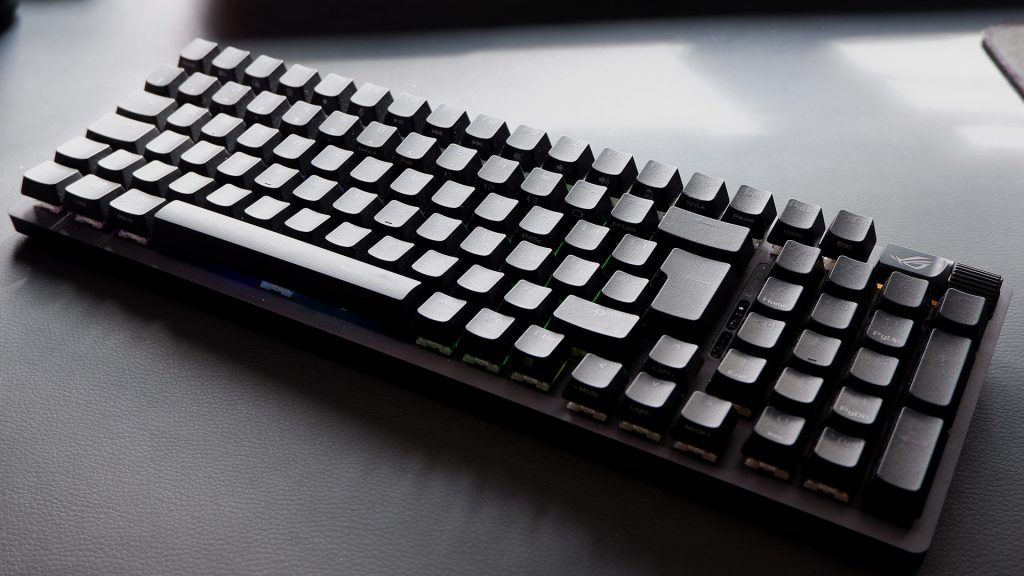
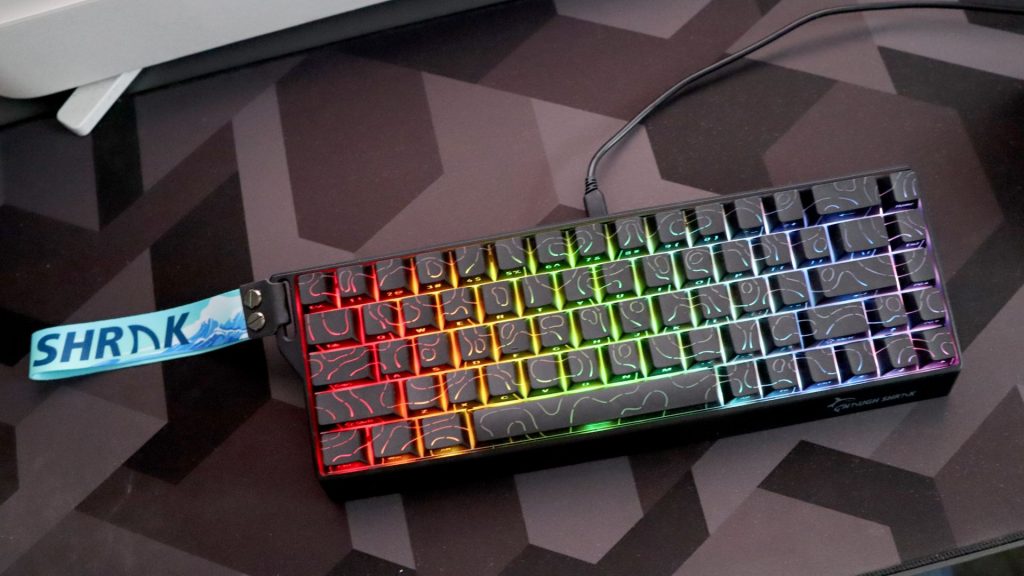
The best gaming keyboard right now is the Asus ROG Strix Scope II 96 Wireless. It excels in every aspect—superb mechanical feel and a full-size yet compact design. But if you want to go for something cheaper, we’ve been blown away by the Gamakay X NaughShark NS68, which is the new best budget gaming keyboard, thanks to the Mountain Everest 60 becoming harder and harder to buy.
One vital aspect of any gaming keyboard purchase is whether to pick a mechanical keyboard. Generally, we’d say it’s always worthwhile considering a mechanical switch over a membrane one. They feel much better for typing and gaming, and they’re generally quicker. Nowadays, we’re seeing more and more specialised switches, such as Hall effect, optical, and even induction, which are becoming great picks for competitive gamers due to features like rapid trigger.
Asus ROG Strix Scope II 96 Wireless
The best overall gaming keyboard
| Specifications | Attributes |
|---|---|
| Switch | Pre-lubed ROG NX switches |
| Size | 96% |
| Backlights | Per-key RGB |
| Passthroughs | None |
| Media Controls | Multi-function wheel |
| Wristrest | Included |
| Keycaps | PBT or ABS |
The best gaming keyboard is the Asus ROG Strix Scope II 96 Wireless. It’s rare that a keyboard is such an all-around joy to use as this is. There are faster, smarter, even cheaper boards—you’ll find all of those recommendations below—but the Strix Scope II 96 Wireless brings together many of the features we’re looking for in a modern gaming keyboard.
it’s been a long time since I’ve been blown away by a gaming keyboard—so many seemed carbon copies of what Corsair did 10 years ago—but the Scope II 96 is mighty impressive. It focuses on nailing the actual mechanics of a mechanical gaming keyboard. Importantly, it’s also great for gaming and doesn’t cost anywhere near as much as its smaller, more premium sibling, the ROG Azoth.
Pros
- Excellent switch feel
- Sound dampening that really works
- Hot-swappable switches
- Adjustable multimedia control wheel
Cons
- Armoury Crate app is messy
Gamakay x NaughShark NS68
The best budget gaming keyboard
| Specifications | Attributes |
|---|---|
| Switch | Outemu Peach Magnetic |
| Size | 68% |
| Backlights | Per-key RGB |
| Passthroughs | None |
| Media Controls | None |
| Wristrest | None |
| Keycaps | PBT double-shot |
The Gamakay x NaughShark NS68 is the best budget gaming keyboard thanks to all of the extra features it packs into a low-cost board. Our previous pick, the Mountain Everest 60, is still a great choice should you find one, but they’re a bit too hard to spot right now for us to recommend.
The Gamakay isn’t just a small and wallet-friendly board; it’s also packed full of new features like rapid trigger and Hall effect switches. It’s frankly astounding to think you can get such advanced extras at such a light price nowadays.
One of the areas the Gamakay lacks is its software. Perhaps one of the single biggest flaws in most great keyboards. It works fine, but it isn’t the cleanest-looking software, and the UI could benefit from a great deal more polish. However, if you can get over that, it’s hard not to admire the robust set of features this Gamakay offers for such a reasonable price.
Pros
- Immensely powerful Hall effect switches
- PBT keycaps at this price are excellent
- Potent software options
Cons
- Lightweight plastics used in construction
- Software’s UI is a tad clunky
Be Quiet! Light Mount
The best silent gaming keyboard
| Specifications | Attributes |
|---|---|
| Switch | Be Quiet! Silent mechanical switches |
| Size | Full-size |
| Backlights | Per-key RGB |
| Passthroughs | None |
| Media Controls | One media knob |
| Wristrest | Included |
| Keycaps | PBT double-shot |
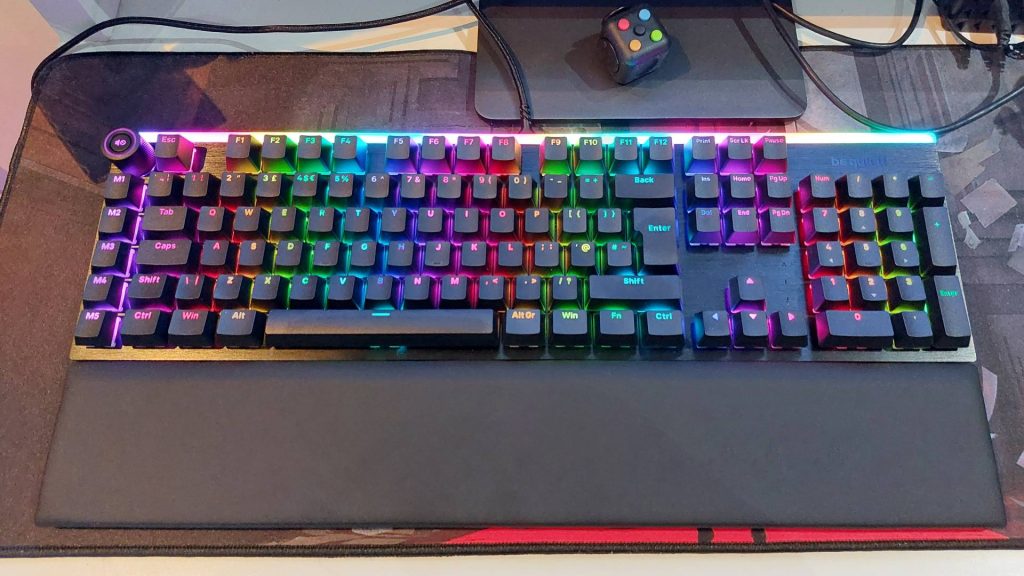
Mechanical keyboards are infamously clacky little beasts, yet the Light Mount says “no more!”, being easily the best silent gaming keyboard out there right now. If you want a keyboard as good as any other premium choice, that won’t infuriate your housemate or colleagues, Be Quiet!’s Light Mount is the way to go. Three layers of sound-dampening foam and silicone cushioning produce that wonderfully muted sound.
Be Quiet!’s parent company acquired Listan Group, which is responsible for the rather gorgeous budget keyboard, the Mountain Everest 60. It’s not quite as affordable as the Everest, but of similarly great quality for its price point.
The only major place this may lose out to similarly priced competition is the lack of competitive features like Rapid Trigger. If you haven’t heard of Rapid Trigger prior, there’s a good chance you don’t need it, though, as it’s a relatively niche way of cutting a couple of milliseconds of reaction time in games.
The main draw here is the quiet keys, but what made us love the Light Mount is everything it manages to cram in at the same time.
Pros
- Actually quiet
- Vibrant RGB lighting
- Straightforward software
- A Mountain Everest 60 successor
Cons
- Game mode options look a little slim
- Not as affordable as the Mountain Everest 60
Keychron Q3 Max
The best tenkeyless gaming keyboard
| Specifications | Attributes |
|---|---|
| Switch | Gateron Jupiter Red/Brown/Banana |
| Size | Tenkeyless (TKL) |
| Backlights | RGB LED |
| Passthroughs | None |
| Media Controls | Dedicated dial |
| Wristrest | None |
| Keycaps | PBT (side-printed or standard) |
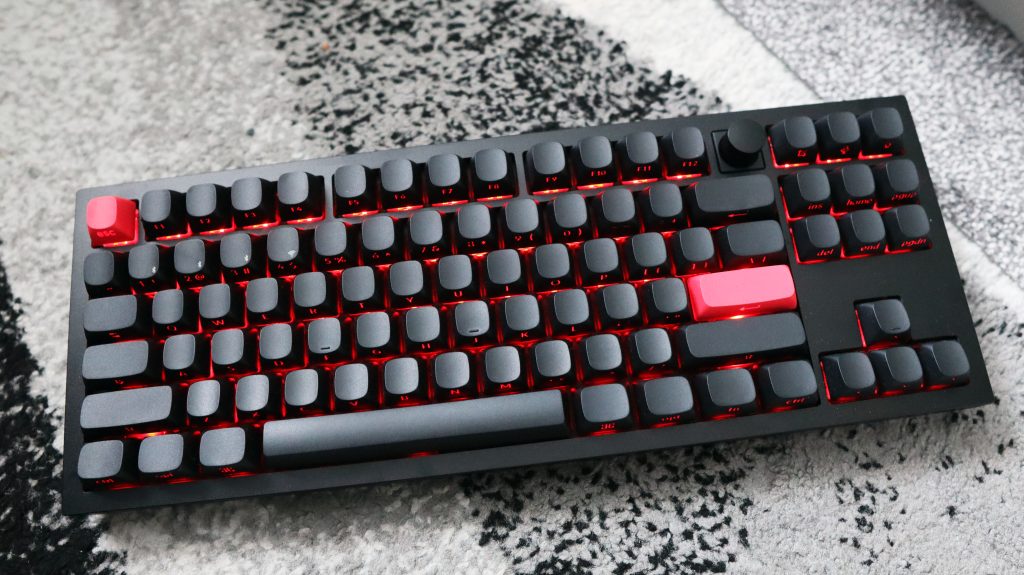
A delightful typing experience wrapped in a weighty block of aluminum, the best tenkeyless gaming keyboard has to be the Keychron Q3 Max.
The Q3 Max is crafted out of a piece of thick, machined aluminum. It weighs a whopping 2.045 kg as a result. Don’t be put off by that, however. We often find that heavier keyboards are sturdier and offer a much-improved typing experience over lighter, flimsier boards.
The Q3 Max comes with a knob, otherwise known as a dial, which offers volume up/down, zoom in/out, brightness up/down, or a whole lot more. It’s whatever you want it to be, within reason, and changeable via the open-source QMK firmware keymap tool, Launcher. Launcher is available to use via a browser, which is pretty neat.
Each key on the Q3 Max is fitted with an RGB backlight, which is also controllable via that same dial and the onboard shortcut keys. There are three switches to choose from: Gateron Jupiter Red, Brown and Banana. All three come pre-lubed, which means, like the ROG Strix Scope II 96, they’re slick to type on.
With wireless functionality across 2.4 GHz via a provided dongle and Bluetooth, or a wired USB Type-C connection, you have a choice of options for connectivity. The battery is a good 180 hours on paper with the backlight disabled, or 100 hours with it on, and in practice, we rarely had to reach for the USB cable to charge the Q3 Max.
Pros
- Ridiculously sturdy
- Smooth, lubed switches
- Solid battery life
Cons
- Solid battery life
- Side mounted keycaps may not be for everyone
Kinesis Freestyle Edge RGB
The best ergonomic gaming keyboard
| Specifications | Attributes |
|---|---|
| Switch | Mechanical (Cherry MX) |
| Size | 95 keys |
| Backlights | Per key RGB |
| Passthroughs | None |
| Media Controls | Shortcuts |
| Wristrest | Built-in |
| Keycaps | ABS |
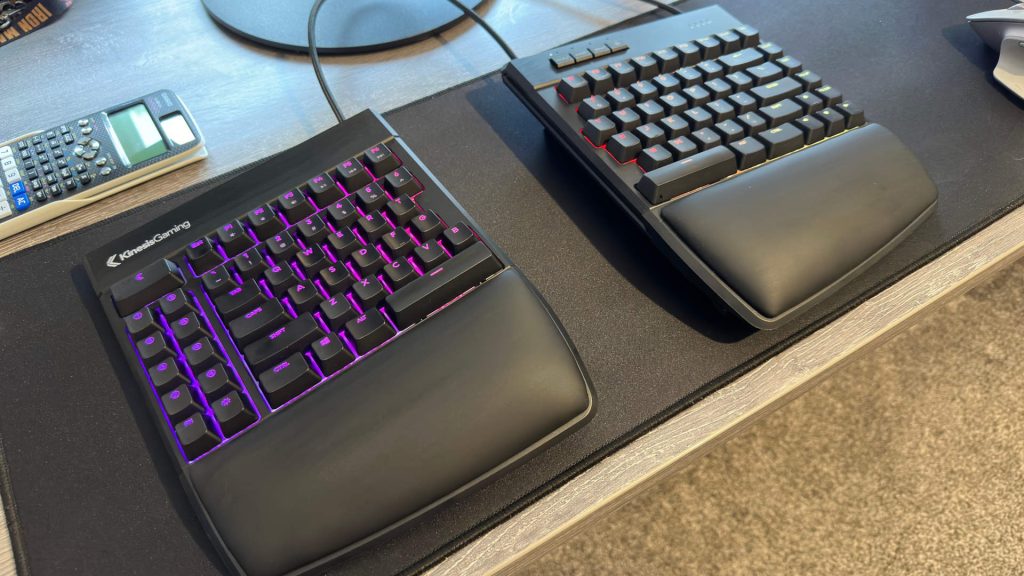
The Kinesis Freestyle Edge RGB has been specifically designed to blend the best of ergonomic and gaming keyboards, which is why it ranks as our pick for the best ergonomic gaming keyboard overall.
The most striking feature of the Kinesis has to be its split design. A single cable connects the two halves, and this offers you the freedom to shift it into a position that’s more comfortable long-term. The best practice is to loosely keep both halves in front of your hands without having to turn in at all at the elbows. Not only is this good for your wrists, but it’s good for your arms and shoulders, too.
All in all, the Kinesis Freestyle Edge RGB is a seriously good ergonomic gaming keyboard and one that shouldn’t be glossed over, even if you were originally thinking of a more standard layout. Ergo keyboards are legion at this point, but the Kinesis Freestyle Edge RGB is the best we’ve tested to date.
Pros
- Super comfortable to use
- Fast and feature-packed
- Lots of macro keys
- Great for smaller hands
Cons
- Fixed cables are pretty stiff
- Lift kit is an optional extra
- Expensive, even for an ergo keeb