 Jawad Abdullah
The best two-in-one devices tend to be convertible laptops with 360-degree hinges, where the keyboard and trackpad rotate around to the back of the display. There are also excellent two-in-ones with a detachable keyboard that are essentially Windows 11 or ChromeOS tablets, but these models tend to work best as tablets.
We’ve put multiple devices to the test to show you the top two-in-one laptops available right now. These best-of-both-worlds machines are highly versatile, allowing you to do far more than a traditional laptop without a significant increase in price, size or weight.
Lenovo Yoga 9i 2-in-1 Aura Edition
| Pros | Cons |
|---|---|
| Beautiful OLED display | Mechanical rather than haptic trackpad |
| Compact package with sleek aesthetics | No HDMI port or SIM card reader |
| Record-setting battery life | |
| Great audio and webcam |
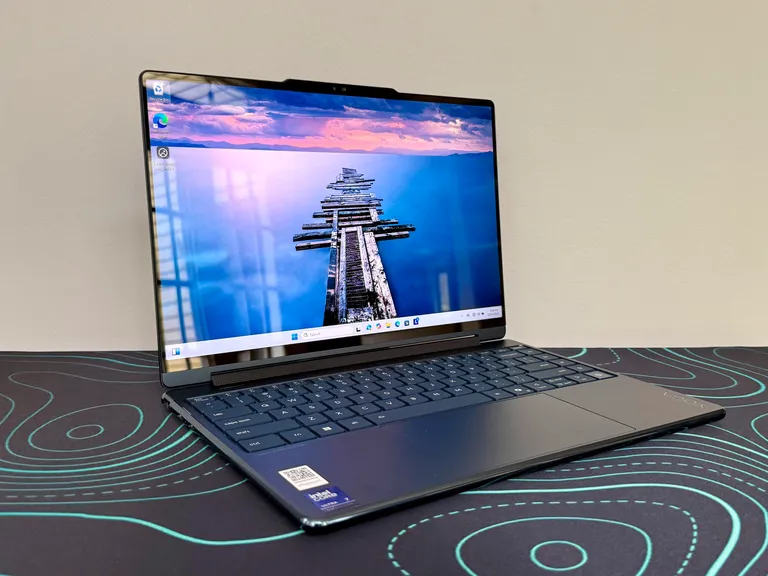
The Lenovo Yoga 9i 2-in-1 Aura Edition is greater than the sum of its parts. Based on a common Intel Core Ultra Series 2 processor, its component lineup is not all that unusual. But placed inside a sleek and compact enclosure and outfitted with a beautiful 2.8K OLED display becomes a truly exceptional two-in-one.
This 14-inch ultraportable two-in-one is well-crafted, well-specced and remarkably well-priced. We love the trim and sturdy chassis, the beautiful 2.8K OLED display and the unique rotating soundbar that produces robust audio output. And the Yoga 9i keeps running and running and running.
| Specifications | Attributes |
|---|---|
| Display | 14-inch 2.8K (2880 × 1800) OLED, 120Hz, touchscreen |
| RAM (Memory) | Up to 32GB LPDDR5X |
| ROM (Storage) | Up to 1TB (or higher configs) PCIe NVMe SSD |
| Processor (CPU) | Intel Core Ultra 7 (e.g., 256V / 258V series) |
| Graphics (GPU) | Intel Arc 140V (integrated) |
| Keyboard | Edge-to-edge backlit keyboard with glass touchpad |
| Weight | Around 1.3–1.4 kg (≈2.9 lbs) |
| Battery Life | 75Wh battery, up to ~12–23 hours depending on usage |
| Color | Storm Grey |
HP OmniBook X Flip 14
| Pros | Cons |
|---|---|
| Stylish and sturdy all-metal design | Battery life isn’t great |
| 3K OLED display is awesome, especially for the price | Display doesn’t have variable refresh rate |
| Included pen is of high quality | You might not like typing on the latticeless keyboard (but I did) |
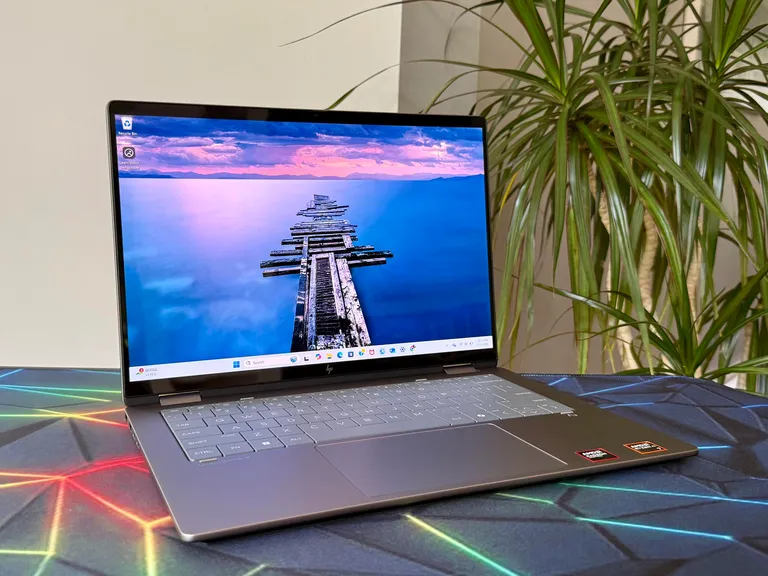
The HP OmniBook X Flip 14 is an eminently configurable convertible laptop. Prefer Intel chips? Not a problem. Favor AMD? You can get those, too. Want to keep the price to a minimum? You can spend as little as $550. Willing to pay more for an OLED display? You can nab a sweet-looking, 3K-resolution OLED panel for only an additional $100. My AMD-based test system featured several upgrades, including the OLED display, and still costs a reasonable $1,150 at HP’s current sale price.
The OmniBook X Flip 14 looks and feels more upscale than its price would suggest, but you should carefully consider how your fingers will feel about the latticeless keyboard. You’re sure to love the 3K OLED, however, which provides a crisp picture, incredible contrast with effectively zero-nit black levels and vibrant colors that pop.
| Specifications | Attributes |
|---|---|
| Display | 14-inch 2K (1920 × 1200) IPS touchscreen or up to 3K (2880 × 1800) OLED, 120Hz |
| RAM (Memory) | Up to 32GB LPDDR5X |
| ROM (Storage) | Up to 1TB PCIe NVMe SSD |
| Processor (CPU) | Intel Core Ultra 5 / Ultra 7 or AMD Ryzen AI 5 / AI 7 |
| Graphics (GPU) | Intel Arc (130V / 140V) or AMD Radeon (840M / 860M) integrated |
| Keyboard | Full-size backlit keyboard |
| Weight | Around 1.38 kg (≈3.0 lbs) |
| Battery Life | 59Wh battery, ~8–10 hours typical usage (varies by model) |
| Color | Glacier Silver / Atmospheric Blue (varies by config) |
Lenovo Yoga 7 14 Gen 9
| Pros | Cons |
|---|---|
| Strong build quality | A little on the heavy side |
| Great performance for the price | Clacky touchpad |
| Long battery life | Uninspired audio output |
| Comfortable, quiet keyboard | |
| Good port selection |
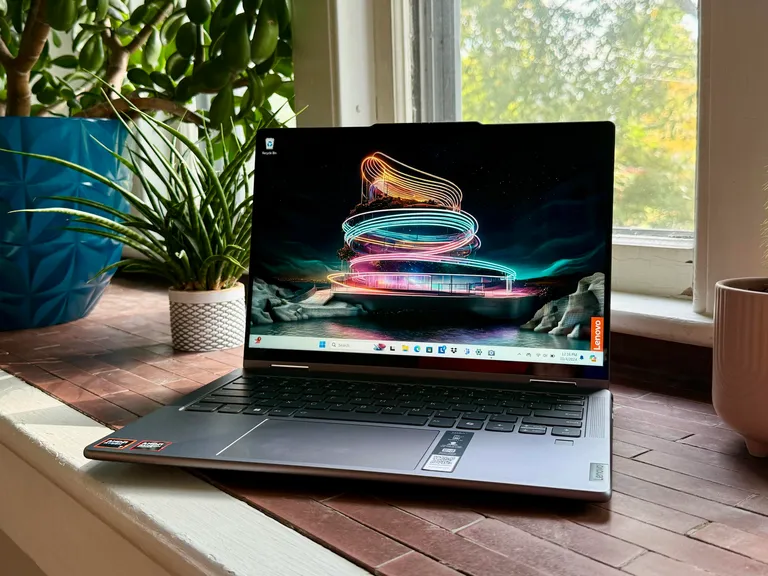
With its excellent build quality, adequate display, strong performance, and lengthy runtime, the Yoga 7 14 Gen 9 offers tremendous value and is a great fit as a versatile machine for home use or students.
Anyone looking for a flexible two-in-one for a great price, including students who might like to take notes in tablet mode. It lacks some of the refinement and extras you get with Lenovo’s flagship Yoga 9i 14, but the midrange Yoga 7 14 is much more affordable. We think it’s the better option for most people.
It’s a great deal at its price of $900 at Best Buy and an even better deal at its regularly discounted price of $800 direct from Lenovo. We like its solid, all-metal chassis and the power and efficiency you get from its AMD Ryzen 7 8000-series CPU.
| Specifications | Attributes |
|---|---|
| Display | 14-inch 2.8K (2880 × 1800) OLED, 120Hz, touchscreen |
| RAM (Memory) | Up to 32GB LPDDR5X |
| ROM (Storage) | Up to 1TB PCIe NVMe SSD |
| Processor (CPU) | Intel Core Ultra 5 125U / Core Ultra 7 155H OR AMD Ryzen 7 8840HS |
| Graphics (GPU) | Intel Arc Graphics (integrated) or AMD Radeon 780M (integrated) |
| Keyboard | Backlit keyboard |
| Weight | Around 1.49–1.61 kg (≈3.3–3.5 lbs) |
| Battery Life | 71Wh battery, up to ~10–15 hours depending on usage |
| Color | Storm Grey / Arctic Grey |
Microsoft Surface Pro 11
| Pros | Cons |
|---|---|
| Excellent OLED display | Mixed graphics performance |
| Very good battery life | Optional Pen and keyboard can get expensive |
| Class-leading NPU performance, for now | Can get hot while plugged in or with intense usage |
| Finally, mainstream-Intel-comparable performance | 16GB is not enough |
| Nice kickstand |
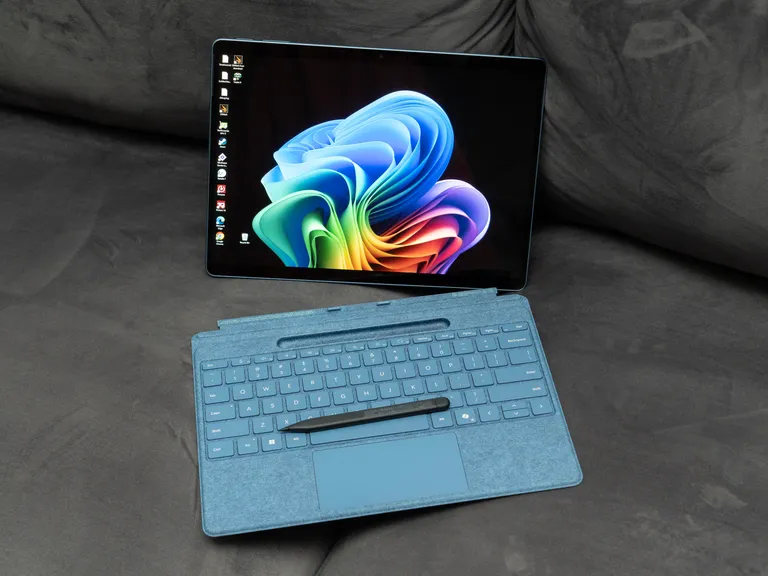
The Surface Pro 11 delivers surprisingly competitive performance and a lot fewer compatibility issues for mainstream use and a lot of graphic design tasks, with long battery life and mostly well-designed hardware.
Two items help make the Microsoft Surface Pro 11 our favorite two-in-one detachable laptop: Qualcomm’s new Snapdragon Elite X processor and an excellent OLED display. The Arm-based CPU delivers competitive performance and significantly fewer compatibility issues for mainstream use compared to previous Windows-on-Arm efforts. It helps that the Surface Pro 11 delivered a long runtime on our battery life test. The 13-inch OLED display offers a crisp 2.8K resolution, along with P3 calibration and true HDR capability.
| Specifications | Attributes |
|---|---|
| Display | 13-inch PixelSense Flow (2880 × 1920), OLED or LCD, 120Hz, touchscreen |
| RAM (Memory) | Up to 32GB LPDDR5X |
| ROM (Storage) | Up to 1TB PCIe Gen4 NVMe SSD |
| Processor (CPU) | Qualcomm Snapdragon X Plus (10-core) / Snapdragon X Elite (12-core) |
| Graphics (GPU) | Qualcomm Adreno GPU (integrated) |
| Keyboard | Detachable Surface keyboard (sold separately) |
| Weight | Around 0.88–0.90 kg (≈1.9 lbs) |
| Battery Life | Up to ~12–15 hours depending on usage |
| Color | Platinum / Black / Sapphire / Dune |
Lenovo Chromebook Duet 11
| Pros | Cons |
|---|---|
| Versatile design | Tricky to use on your lap |
| Great battery life | Rear cover magnets could be stronger |
| Improved pen performance | |
| Camera privacy shutter | |
| Spill-resistant keyboard cover included |
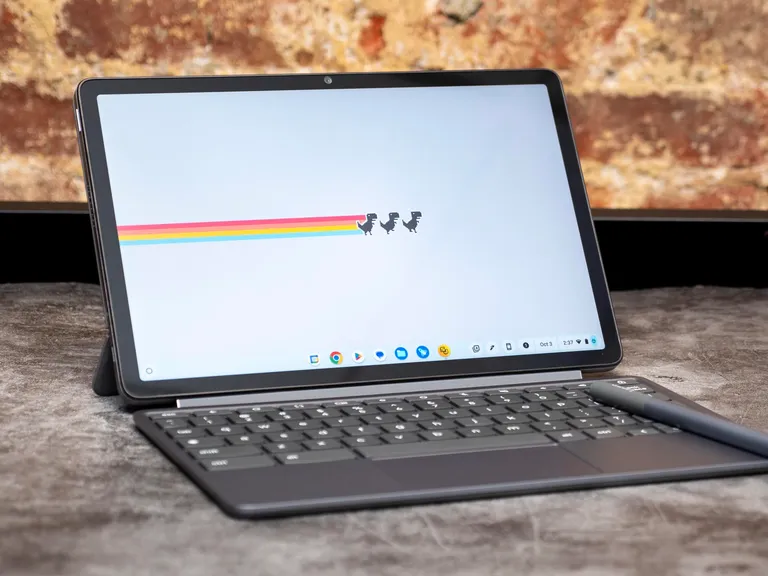
The Lenovo Duet 11 is a perfect, inexpensive secondary computer. It’s small, so you can pick it up and use it anywhere to take a Zoom call, dash off a work email, order groceries or pay bills online. When you’re done with work, you can pull off the magnetically attached keyboard and binge-watch some shows, play mobile games, listen to music or unwind with an ebook. Plus, with support for USI 2.0 pens, the Duet can be used for sketching or taking notes.
Students who want a versatile and portable two-in-one for school. Or just anyone looking for a small and fun secondary device.
People who want a screen larger than 11 inches in their next two-in-one or prefer Windows to ChromeOS.
| Specifications | Attributes |
|---|---|
| Display | 10.95-inch WUXGA (1920 × 1200) IPS, 60Hz, touchscreen |
| RAM (Memory) | Up to 8GB LPDDR4X |
| ROM (Storage) | Up to 128GB eMMC |
| Processor (CPU) | MediaTek Kompanio 838 (octa-core) |
| Graphics (GPU) | ARM Mali-G57 MC3 (integrated) |
| Keyboard | Detachable keyboard (included) |
| Weight | Tablet: ~510g (≈1.12 lbs), With keyboard & stand: ~1.1 kg (≈2.4 lbs) |
| Battery Life | 29Wh battery, up to ~12 hours depending on usage |
| Color | Luna Grey |